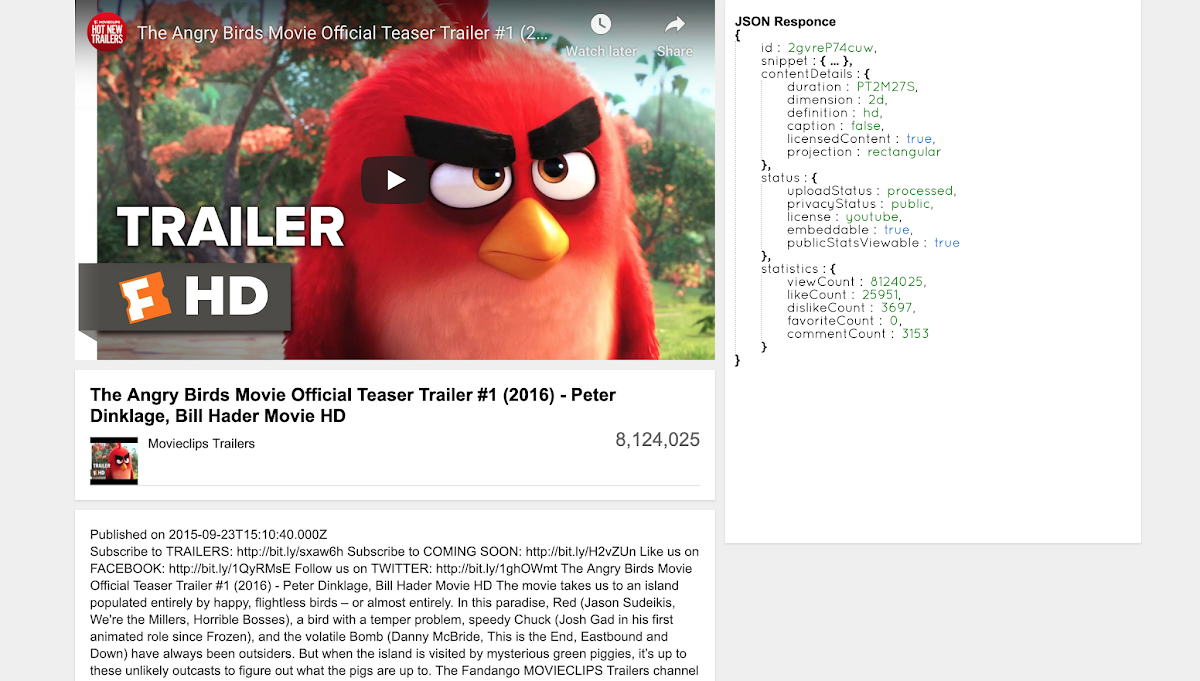
Here w3 tweaks done YouTube Video API call tutorial and demo for users. From this tutorial W3 Tweaks covered below functionalities.
- Embed YouTube video from YouTube API call
- Display Video description, Hits, YouTube Video title and publish date.
- Displayed JSON request from YouTube API call for user review
- YouTube like theme
- Responsive design
- YouTube time format change
CSS Code
`<link rel="stylesheet" href=" http://demo.w3tweaks.com/youtube_video/maincss.css" type="text/css">`HTML Code
`<div id="hyv-player-page" class="hyv-player-watch">
    <div class="hyv-content-left hyv-player">
        <div id="hyv-player-api" class="hyv-player-width hyv-player-height hyv-off-screen-target hyv-player-api"> </div>
        <div id="hyv-watch-content" class="hyv-watch-main-col">
            <!-- Video header start -->
            <div id="hyv-watch-header" class="hyv-card hyv-card-has-padding">
                <!-- Video title start -->
                <div id="hyv-watch-headline" class="clearfix">
                    <div id="hyv-watch-headline-title">
                        <h1 class="hyv hyv-watch-title-container"> <span id="hyv-eow-title" class="hyv-watch-title" dir="ltr" title=""></span> </h1>
                    </div>
                </div>
                <!-- Video title end -->
                <!-- Video user header -->
                <div id="hyv-watch-user-header">
                    <a class="hyv-user-photo"> <span class="hyv-video-thumb hyv-thumb hyv-thumb-48"> <span class="hyv-thumb-square"> <span class="hyv-thumb-clip"></span> </span>
                        </span>
                    </a>
                    <div class="hyv-user-info"></div>
                    <div class="hyv-social-send"></div>
                </div>
                <!-- Video user header end -->
                <!-- Social buttons start-->
                <div id="hyv-watch-social-buttons" class="hyv-watch-social-buttons clearfix">
                    <div id="hyv-watch-social-actions" class="hyv-watch-social-actions hyv-button-group"></div>
                    <div id="hyv-watch-social-actions-like" class="hyv-watch-social-actions-like">
                        <div id="hyv-watch-views-info">
                            <div class="hyv-watch-view-count"></div>
                        </div>
                    </div>
                </div>
                <!-- Social buttons end-->
            </div>
            <!-- Video header end -->
            <!-- Video details start -->
            <div id="hyv-watch-details" class="hyv-card hyv-card-has-padding">
                <div id="hyv-watch-description">
                    <div id="hyv-watch-description-content">
                        <div id="hyv-watch-description-clip">
                            <div id="hyv-watch-uploader-info"> <strong class="hyv-watch-time-text"></strong> </div>
                            <div id="hyv-watch-description-text" class="">
                                <p id="hyv-eow-description"></p>
                            </div>
                        </div>
                    </div>
                </div>
            </div>
            <!-- Video details end -->
        </div>
    </div>
    <div id="hyv-watch-sidebar" class="hyv-watch-sidebar">
        <div id="hyv-watch-sidebar-contents" class="hyv-card hyv-card-has-padding">
            <!-- Ads width 300px holder start -->
            <div id="hyv-watch-sidebar-ads">
                <div id="hyv-watch-channel-brand-div" class="">
                    <div id="hyv-watch-channel-brand-div-text">Advertisement</div>
                    <div id="hyv-companion-ad-div"> </div>
                </div>
            </div>
            <!-- Ads width 300px holder end -->
            <!-- Sidebar content start -->
            <div id="hyv-watch-sidebar-modules">
                <div class="hyv-watch-sidebar-section">
                    <div style="font-weight:bold;">JSON Responce</div>
                    <div class="hyv-watch-sidebar-body" style="height:500px;overflow:scroll;"> </div>
                </div>
            </div>
            <!-- Sidebar content end -->
        </div>
    </div>
</div>`
Note: If you have any clarification on the above HTML Code please do comment will replay back
Include jQuery plugin
`<script src="//code.jquery.com/jquery-2.1.4.js" type="text/javascript"></script>``$(document).ready(function() { //jquery
var video = $(location).attr('href').split('v=')[1];
function numberformat(number, n, x) {
var re = '(\\d)(?=(\\d{' + (x || 3) + '})+' + (n > 0 ? '\\.' : ') + ')';
return number.toFixed(Math.max(0, ~~n)).replace(new RegExp(re, 'g'), '$1,');
};
$.ajax({
cache: false,
data: $.extend({
key: 'API_KEY',
id: video
}, {}),
dataType: 'json',
type: 'GET',
timeout: 5000,
url: 'https://www.googleapis.com/youtube/v3/videos?part=snippet,contentDetails,statistics,status&fields=items(id,snippet,statistics,contentDetails,status)'
}).done(function(data) {
var items = data.items[0];
console.log(items); // Add player
$("#hyv-player-api").html('<iframe width="100%" height="100%" src="https://www.youtube.com/embed/' + items.id + '?rel=1&showinfo=1" frameborder="0" allowfullscreen=""></iframe>'); // Add title
$("#hyv-eow-title").text(items.snippet.title); // Add thumb img
$(".hyv-thumb-clip").html('<img width="48" height="48" src="' + items.snippet.thumbnails.default.url + '" />'); // Add View Count
$("#hyv-watch-views-info .hyv-watch-view-count").text(numberformat(parseInt(items.statistics.viewCount))); // Add title
$(".hyv-user-info").text(items.snippet.channelTitle); // Add publish data
$(".hyv-watch-time-text").text("Published on " + items.snippet.publishedAt); // Add publish data
$("#hyv-eow-description").text(items.snippet.description);
new PrettyJSON.view.Node({
el: $(".hyv-watch-sidebar-body"),
data: items
});
});
});`Note: Replace ‘API_KEY’ with your youtube api key
YouTube API Call URL
`https://www.googleapis.com/youtube/v3/videos?part=snippet,contentDetails,statistics,status&fields=items(id,snippet,statistics,contentDetails,status)`Please feel free to comment the article and like & share if you like the article