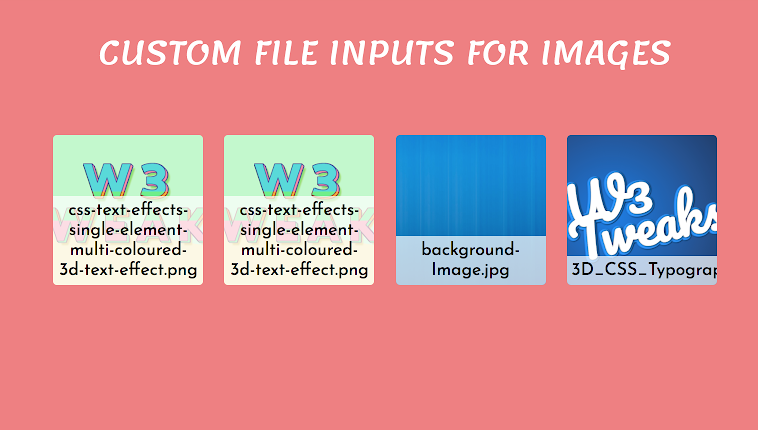
Custom input field to select image files to show instantly on the page for get excellent user experience. Custom file inputs with image preview and image file name on selection. Find the demo below.
Date: FEBRUARY 28, 2018
Snippet
SCSS
`* {
  -webkit-box-sizing: border-box;
  -moz-box-sizing: border-box;
  box-sizing: border-box;
}
body{
  margin: 0;
  padding: 1rem;
  font-family: 'Josefin Sans', sans-serif;
  font-size: 16px;
  background: lightcoral;
}
#page{
  text-align: center;
  h1{
    margin-bottom: 4rem;
    font-family: 'Lemonada', cursive;
    text-transform: uppercase;
    font-weight: normal;
    color: #fff;
    font-size: 2rem;
  }
}

.wrap-custom-file{
  position: relative;
  display: inline-block;
  width: 150px;
  height: 150px;
  margin: 0 0.5rem 1rem;
  text-align: center;
  input{
    position: absolute;
    top: 0;
    left: 0;
    width: 2px;
    height: 2px;
    overflow: hidden;
    opacity:0;
  }
  label{
    z-index: 1;
    position: absolute;
    left:0; top: 0; bottom: 0; right: 0;
    width: 100%;
    overflow: hidden;
    padding: 0 0.5rem;
    cursor: pointer;
    background-color: #fff;
    border-radius: 4px;
    -webkit-transition: -webkit-transform 0.4s;
    -moz-transition: -moz-transform 0.4s;
    -ms-transition: -ms-transform 0.4s;
    -o-transition: -o-transform 0.4s;
    transition: transform 0.4s;
    span{
      display: block;
      margin-top: 2rem;
      font-size: 1.4rem;
      color: #777;
      -webkit-transition: color 0.4s;
      -moz-transition: color 0.4s;
      -ms-transition: color 0.4s;
      -o-transition: color 0.4s;
      transition: color 0.4s;
    }
    .fa{
      position: absolute;
      bottom: 1rem;
      left: 50%;
      -webkit-transform: translatex(-50%);
      -moz-transform: translatex(-50%);
      -ms-transform: translatex(-50%);
      -o-transform: translatex(-50%);
      transform: translatex(-50%);
      font-size: 1.5rem;
      color: lightcoral;
      -webkit-transition: color 0.4s;
      -moz-transition: color 0.4s;
      -ms-transition: color 0.4s;
      -o-transition: color 0.4s;
      transition: color 0.4s;
    }
    &:hover{
      -webkit-transform: translateY(-1rem);
      -moz-transform: translateY(-1rem);
      -ms-transform: translateY(-1rem);
      -o-transform: translateY(-1rem);
      transform: translateY(-1rem);
      span, .fa{
        color: #333;
      }
    }
    &.file-ok{
      //Styles img background
      background-size: cover;
      background-position: center;
      span{
        position: absolute;
        bottom: 0;
        left: 0;
        width: 100%;
        padding: 0.3rem;
        font-size: 1.1rem;
        color: #000;
        background-color: rgba(255,255,255,.7);
      }
      .fa{
        display: none;
      }
    }
  }
}`
HTML
`<div id="page">
  <header>
    <h1>Custom File Inputs For Images</h1>
  </header>

  <!-- Our File Inputs -->
  <div class="wrap-custom-file">
    <input type="file" name="image1" id="image1" accept=".gif, .jpg, .png" />
    <label  for="image1">
      <span>Select Image One</span>
      <i class="fa fa-plus-circle"></i>
    </label>
  </div>

  <div class="wrap-custom-file">
    <input type="file" name="image2" id="image2" accept=".gif, .jpg, .png" />
    <label  for="image2">
      <span>Select Image Two</span>
      <i class="fa fa-plus-circle"></i>
    </label>
  </div>

  <div class="wrap-custom-file">
    <input type="file" name="image3" id="image3" accept=".gif, .jpg, .png" />
    <label  for="image3">
      <span>Select Image Three</span>
      <i class="fa fa-plus-circle"></i>
    </label>
  </div>

   <div class="wrap-custom-file">
    <input type="file" name="image4" id="image4" accept=".gif, .jpg, .png" />
    <label  for="image4">
      <span>Select Image Four</span>
      <i class="fa fa-plus-circle"></i>
    </label>
  </div>
<!-- End Page Wrap -->
</div>`
JavaScript
`$('input').each(function(){
  // Refs
  var $file = $(this),
      $label = $file.next('label'),
      $labelText = $label.find('span'),
      labelDefault = $labelText.text();

  // When a new file is selected
  $file.on('change', function(event){
    var fileName = $file.val().split( '\\' ).pop(),
        tmppath = URL.createObjectURL(event.target.files[0]);
    //Check successfully selection
		if( fileName ){
      $label
        .addClass('file-ok')
        .css('background-image', 'url(' + tmppath + ')');
			$labelText.text(fileName);
    }else{
      $label.removeClass('file-ok');
			$labelText.text(labelDefault);
    }
  });

// End loop of file input elements
});`